0.8mm vs 0.4mm Metal Business Cards: Which Should You Order?
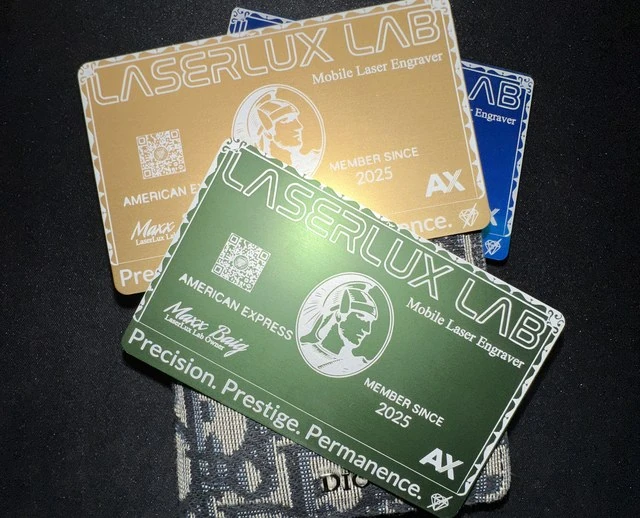
Choose 0.8mm if the card is a statement and 0.4mm if the card is a tool you hand out often. A 0.8mm metal card feels heavy and permanent. A 0.4mm card is lighter, slides into a wallet easily and keeps the premium metal look at a lower weight. Both are laser engraved, so the logo and text are cut into the metal and will not peel or fade like ink.
The short answer
| 0.8mm | 0.4mm | |
|---|---|---|
| Feel | Heavy, rigid, solid | Light, flexible-feeling, slim |
| Best for | Executives, luxury sales, high-end introductions | Everyday networking, events, larger hand-outs |
| Wallet fit | Thick, noticeable | Slim, easy to carry |
| First impression | "Keep this one" | "Premium and practical" |
If you are not sure, order one sample. The first sample card is free, and holding it settles the question faster than any spec sheet.
Who should pick 0.8mm
The 0.8mm card is for people who hand out only a few cards a week and want each one remembered. Think of a real estate broker meeting a seller, a builder presenting to a developer, or a founder meeting an investor. The weight tells the other person the card matters.
Heavier cards are also the better pick when the design is simple. A single logo and one line of contact details looks confident on a thick card.
Who should pick 0.4mm
The 0.4mm card suits people who give out cards all day. Sales teams, recruiters and event staff move a lot of cards, and a slim card is easier to carry in bulk. It still looks and feels like metal, and the engraving is as sharp.
If you want the same card for a whole team, 0.4mm is usually the practical choice.
What laser engraving does for the design
Engraving cuts the design into the surface. That means fine lines, small text and logos stay crisp. It also means the design is permanent, and a card that rides in a pocket for a year still looks sharp.
We engrave a maximum design area of 5 by 5 inches, which is far larger than a card needs. The real limit is legibility: keep contact text large enough to read at a glance.
Getting your logo ready
You do not need a design file. Upload a PNG or JPEG of your logo in the Cards tab of the app. The tool traces it into a clean vector and shows both sides of the card with a live price. If the trace looks off, a higher-resolution image almost always fixes it.
Preview my logo on a metal card →
Colors and finishes
Metal cards come in several color and finish options, and the app shows them on the card so you can compare before you commit. Dark finishes make an engraved logo stand out sharply. Lighter finishes give a softer, brushed look. Choose based on how your logo reads against the base.
QR codes
A small QR code on the back turns the card into a doorway to your website, booking page or contact details. Keep it large enough to scan from a normal distance, and test the print preview on your phone before you order.
Ordering
The minimum order is 25 cards. If you want fewer, message the laser artist, who can usually make an exception. Pricing updates live in the app as you change options, so you see the number before you send anything.
| Step | What happens |
|---|---|
| 1 | Upload your logo in the Cards tab |
| 2 | Pick 0.8mm or 0.4mm, color and quantity |
| 3 | Preview both sides and see the price |
| 4 | Send the request and the laser artist follows up |
A quick way to decide
Ask how many cards you hand out in a month. Under 30, go 0.8mm and make each one count. Over 100, go 0.4mm and keep a stack in your bag. In between, order a sample of each and keep the one you reach for first.
If you also need gifts for clients, see our guide to custom engraved gifts.
Common questions
Are metal cards worth the cost? They cost more than paper. They also last, and people keep them. Many owners use metal for first meetings and paper for bulk hand-outs.
Can I mix both thicknesses? Yes. Some teams give executives 0.8mm and the sales floor 0.4mm. Message the laser artist and we can set it up.
Design choices that look best on metal
Metal rewards restraint. These choices tend to work well on both thicknesses.
- Keep the front simple. A logo and a name beat a crowded layout.
- Use the back for details such as phone, email and a QR code.
- Avoid very thin lines and tiny text. The laser is precise, but a card is read at arm's length.
- Choose a base color that contrasts with the logo, so the engraving stands out.
Matching the card to the job
| Role | Suggested card | Reason |
|---|---|---|
| Real estate broker | 0.8mm | Memorable at listing presentations |
| Builder or developer | 0.8mm | Signals solid, lasting work |
| Founder meeting investors | 0.8mm | One card that gets kept |
| Sales team | 0.4mm | Easy to carry and replace |
| Event staff | 0.4mm | Higher volume hand-outs |
| Whole company standard | 0.4mm | Consistent look across a team |
Paper versus metal
Metal costs more per card than paper, so it makes sense to use it where it counts. Many owners keep a small stack of metal cards for first meetings and key introductions, and a paper stack for bulk hand-outs. The metal card becomes a signal that the person you gave it to matters to you.
What to check before you send the request
- Spelling of every name, title and email address.
- That your logo preview looks clean on both sides.
- That any QR code is large enough to scan.
- The quantity, with the 25-card minimum in mind.
- The thickness, 0.8mm or 0.4mm, for the use you picked.
Common questions
What is the minimum order for metal business cards?
The minimum is 25 cards. If you need fewer, message the laser artist, who can usually make an exception.
Can I get a sample first?
Yes. The first sample card is free.
How do I check my logo before ordering?
Use the Cards tab in the LaserLux Lab app. Upload a PNG or JPEG, preview both sides of the card and see a live price.
Do you work with a studio?
LaserLux Lab is 100% mobile and based in Princeton, TX. We serve Dallas-Fort Worth.